> ## Documentation Index
> Fetch the complete documentation index at: https://docs.refile.co/llms.txt
> Use this file to discover all available pages before exploring further.
# Make.com Integration
> Use refile with Make.com
# Make.com Integration
Get started with refile in Make.com in three simple steps:
## 1. Download the Blueprint
First, download our pre-configured Make.com blueprint:
{
const blueprint = {
name: "Integration Tools, HTTP",
flow: [
{
id: 4,
module: "util:SetVariable2",
version: 1,
parameters: {},
mapper: {
name: "markdown",
scope: "roundtrip",
value: "# Text\ntest",
},
metadata: {
designer: {
x: 176,
y: -4,
},
restore: {
expect: {
scope: {
label: "One cycle",
},
},
},
expect: [
{
name: "name",
type: "text",
label: "Variable name",
required: true,
},
{
name: "scope",
type: "select",
label: "Variable lifetime",
required: true,
validate: {
enum: ["roundtrip", "execution"],
},
},
{
name: "value",
type: "any",
label: "Variable value",
},
],
interface: [
{
name: "markdown",
label: "markdown",
type: "any",
},
],
},
},
{
id: 7,
module: "json:TransformToJSON",
version: 1,
parameters: {
space: "",
},
mapper: {
object: "{{4.markdown}}",
},
metadata: {
designer: {
x: 476,
y: -4,
},
restore: {
parameters: {
space: {
label: "Empty",
},
},
},
parameters: [
{
name: "space",
type: "select",
label: "Indentation",
validate: {
enum: ["tab", "2", "4"],
},
},
],
expect: [
{
name: "object",
type: "any",
label: "Object",
},
],
},
},
{
id: 6,
module: "http:ActionSendDataAPIKeyAuth",
version: 3,
parameters: {
auth: 51744,
handleErrors: false,
},
mapper: {
url: "https://www.refile.co/api/v1/pdf/markdown",
serializeUrl: false,
method: "post",
headers: [],
qs: [],
bodyType: "raw",
parseResponse: false,
timeout: "",
shareCookies: false,
ca: "",
rejectUnauthorized: true,
followRedirect: true,
useQuerystring: false,
gzip: true,
useMtls: false,
contentType: "application/json",
data: '{\n "markdown": {{7.json}},\n "output": "url",\n "theme": "modern",\n "pageSize": "A4"\n}',
followAllRedirects: false,
},
metadata: {
designer: {
x: 776,
y: -4,
},
restore: {
parameters: {
auth: {
label: "refile",
},
},
expect: {
method: {
mode: "chose",
label: "POST",
},
headers: {
mode: "chose",
},
qs: {
mode: "chose",
},
bodyType: {
label: "Raw",
},
contentType: {
label: "JSON (application/json)",
},
},
},
parameters: [
{
name: "auth",
type: "keychain:apikeyauth",
label: "Credentials",
required: true,
},
{
name: "handleErrors",
type: "boolean",
label:
"Evaluate all states as errors (except for 2xx and 3xx )",
required: true,
},
],
expect: [
{
name: "url",
type: "url",
label: "URL",
required: true,
},
{
name: "serializeUrl",
type: "boolean",
label: "Serialize URL",
required: true,
},
{
name: "method",
type: "select",
label: "Method",
required: true,
validate: {
enum: [
"get",
"head",
"post",
"put",
"patch",
"delete",
"options",
],
},
},
{
name: "headers",
type: "array",
label: "Headers",
spec: [
{
name: "name",
label: "Name",
type: "text",
required: true,
},
{
name: "value",
label: "Value",
type: "text",
},
],
},
{
name: "qs",
type: "array",
label: "Query String",
spec: [
{
name: "name",
label: "Name",
type: "text",
required: true,
},
{
name: "value",
label: "Value",
type: "text",
},
],
},
{
name: "bodyType",
type: "select",
label: "Body type",
validate: {
enum: ["raw", "x_www_form_urlencoded", "multipart_form_data"],
},
},
{
name: "parseResponse",
type: "boolean",
label: "Parse response",
required: true,
},
{
name: "timeout",
type: "uinteger",
label: "Timeout",
validate: {
max: 300,
min: 1,
},
},
{
name: "shareCookies",
type: "boolean",
label: "Share cookies with other HTTP modules",
required: true,
},
{
name: "ca",
type: "cert",
label: "Self-signed certificate",
},
{
name: "rejectUnauthorized",
type: "boolean",
label:
"Reject connections that are using unverified (self-signed) certificates",
required: true,
},
{
name: "followRedirect",
type: "boolean",
label: "Follow redirect",
required: true,
},
{
name: "useQuerystring",
type: "boolean",
label:
"Disable serialization of multiple same query string keys as arrays",
required: true,
},
{
name: "gzip",
type: "boolean",
label: "Request compressed content",
required: true,
},
{
name: "useMtls",
type: "boolean",
label: "Use Mutual TLS",
required: true,
},
{
name: "contentType",
type: "select",
label: "Content type",
validate: {
enum: [
"text/plain",
"application/json",
"application/xml",
"text/xml",
"text/html",
"custom",
],
},
},
{
name: "data",
type: "buffer",
label: "Request content",
},
{
name: "followAllRedirects",
type: "boolean",
label: "Follow all redirect",
required: true,
},
],
},
},
{
id: null,
module: "placeholder:Placeholder",
metadata: {
designer: {
x: 1076,
y: -4,
},
},
},
],
metadata: {
instant: false,
version: 1,
scenario: {
roundtrips: 1,
maxErrors: 3,
autoCommit: true,
autoCommitTriggerLast: true,
sequential: false,
slots: null,
confidential: false,
dataloss: false,
dlq: false,
freshVariables: false,
},
designer: {
orphans: [],
},
zone: "eu1.make.com",
notes: [],
},
};
const jsonContent = JSON.stringify(blueprint, null, 2);
const blob = new Blob([jsonContent], { type: "application/json" });
const url = URL.createObjectURL(blob);
const a = document.createElement("a");
a.href = url;
a.download = "make_blueprint.json";
document.body.appendChild(a);
a.click();
document.body.removeChild(a);
URL.revokeObjectURL(url);
}}
style={{ textDecoration: "underline" }}
>
Download Make.com Blueprint
## 2. Import to Make.com
1. Open Make.com and create a new scenario
2. Click the "Import Blueprint" button
3. Select the downloaded blueprint file
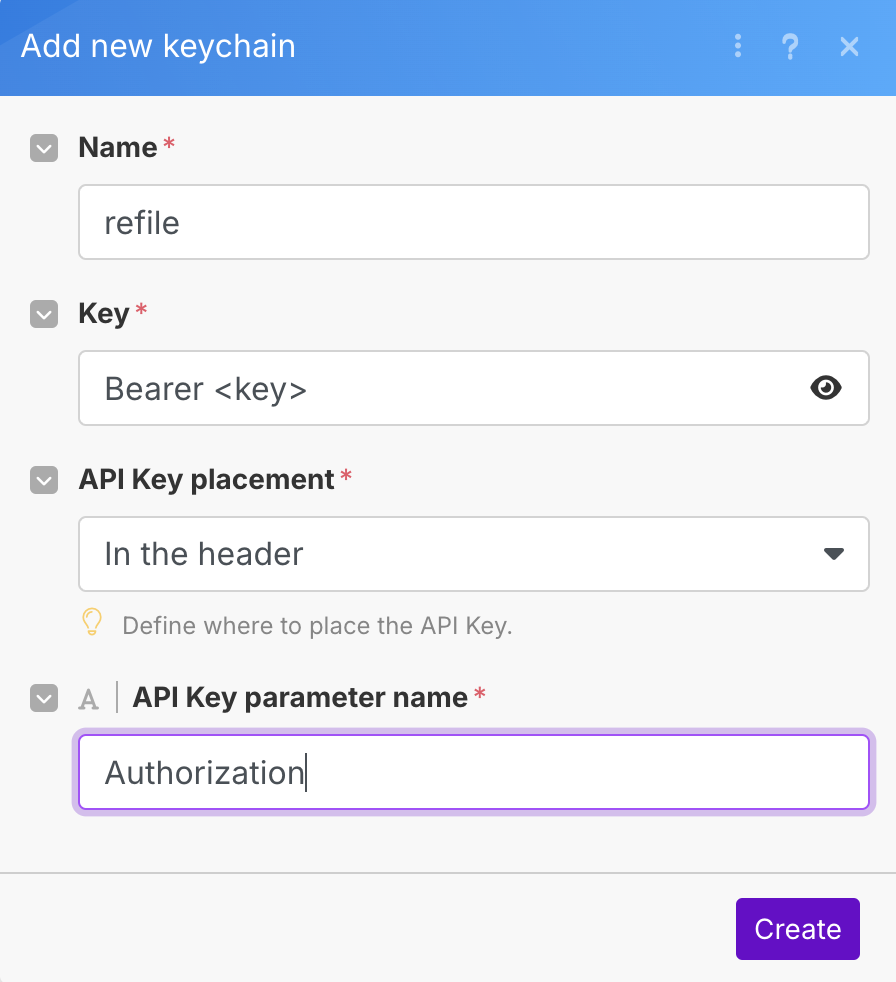
## 3. Set Up Credentials in HTTP request node
Configure your Make.com credentials:
 ## Run & Use!
Once you've completed these steps, your Make.com scenario is ready to use with refile. The blueprint includes all necessary configurations to get you started quickly.
## Run & Use!
Once you've completed these steps, your Make.com scenario is ready to use with refile. The blueprint includes all necessary configurations to get you started quickly.